
Momentum Mastery
why i stopped tracking mix revision notes in apple notes
how issue stacks keep mix revision notes from getting lost, rewritten, or forgotten
Kay @ Muser Plugins · · 6 min read
I track mix revision notes as one issue stack:
- One problem at one spot (channel + timestamp)
- The origin stays the headline
- Each newer mix gets one update, not a rewrite
- Client comments join that thread
- Status follows the work: active, then testing, then resolved
The list wasn't the problem. A list that doesn't travel with the mix is.
how i used to track mix notes in apple notes
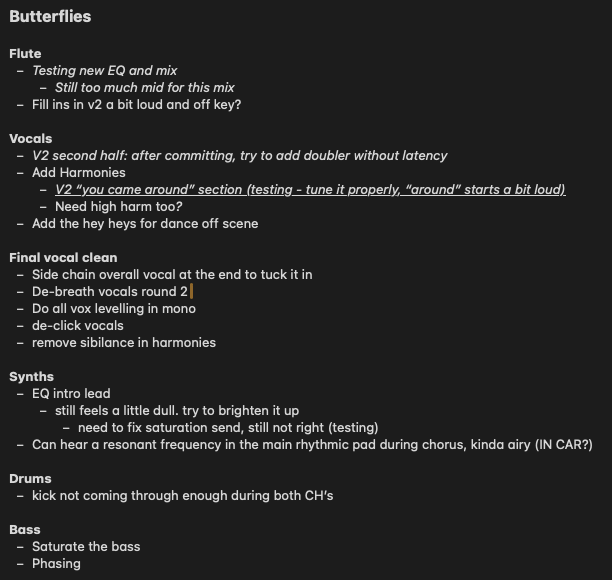
I tracked mix revision notes as one Apple Note per project: channel headings, then nested bullets I versioned by hand. I hoped I could still tell which line was the latest.
It felt fast. I already had Notes open. I'd hear something, alt-tab, type Fill ins in v2 a bit loud and off key?, then jump back into the session. For a first pass, that was enough. One song, one list, a handful of bullets.
Then the second bounce happened. I wouldn't start a new note. I'd go back to the same comment and add another dot point underneath it with the latest update. EQ intro lead became still feels a little dull. try to brighten it up, then need to fix saturation send, still not right (testing). I was building my own versioning process inside a list: origin, then a trail of updates I had to keep straight by hand. Client comments lived somewhere else entirely: iMessage, email, a voice note I'd transcribe badly into the same list.
None of that was mixing. It was filing.
why that list got messy so fast
Apple Notes could store sentences. It couldn't tell me which mix a sentence belonged to, where it sat on the timeline, or whether I'd already addressed it.
Arrangement, then mixing, then mastering, all in the same note: Flute, Vocals, Synths, Drums, Bass, nested lines everywhere. Scanning it meant reading the whole project. There was no timestamp I could click to hear the moment. If I wrote kick not coming through enough during both CH's, I had to find both choruses myself.
The note also didn't know which mix I meant. Sometimes I typed v2 into the line. Sometimes I didn't. Fill ins in v2 a bit loud and off key? sat next to bullets with no version at all. Status was a word in brackets, like (testing), not something the list kept for me.
Client comments made it messier. They came in through iMessage or email, and I'd paste them into the note by hand. Two places, no shared mix, nothing to play back. The list was just text. It didn't have a moment on the track, a mix lock, a real channel, or one thread when the client said the same thing.
why issue stacks are necessary
Mix feedback is about a moment on a track that keeps coming back until it's gone. A flat list can't do that job, because the job is a thread, not a sentence.
EQ intro lead with two nested lines is what I had. I was mapping those lines to whichever bounce I was on by memory. Same channel, nearby timestamp, same problem: that's the stack.
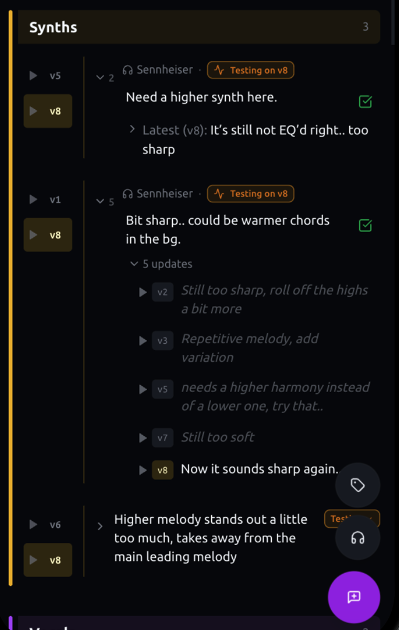
The origin has to stay. If I rewrite the first note, I erase the only honest version of it, and I lose the reference for what I was actually trying to solve. Updates belong on newer mixes: what I changed, what I heard, what still isn't there. One producer update per mix so the log stays readable. Client comments on that same spot belong in the same stack, not a parallel conversation I have to reconcile later.
Without that, revision notes are just memory with formatting. They die the moment you bounce, or the moment you "clean up" the list. That's why issue stacks aren't a preference for me. They're the only structure that matches how mix feedback actually works.
what the stack does now
In minims the note sits on the mix. I can click it and hear the moment, on a real channel, and A/B the origin against the latest bounce at that marker.
That's the same versioning I used to do with nested bullets. I just don't reconstruct the list to see which version I'm testing.
When a client flags the same spot through the portal, their row doesn't replace mine. I can answer the actual issue instead of hunting for which bullet, which indent, which bounce.
I mark it resolved after I've checked it on a newer mix.
questions i still get about mix revision notes
Can you just use Apple Notes for mix revisions?
I did, for years. Apple Notes will hold the sentences. It won't play kick not coming through enough during both CH's, and it won't know whether still feels a little dull was this bounce or the last one. I was using a list as a mix session.
Why not just add a new bullet for each update?
That's what I did under Add Harmonies: V2 "you came around" section (testing - tune it properly, "around" starts a bit loud). Nested still meant I had to remember which mix it was, and I still had to find the section myself.
Should I rewrite an old note when I think I've fixed it?
I don't. If I overwrite EQ intro lead, I lose what I was actually chasing. I leave that line and add what I heard on the next mix.
What do you do when a client comments on something you already addressed? I used to paste it into the note from iMessage and treat it like a new job. If it's the same spot, it belongs with the original note, not under a new heading.
When do you mark something resolved?
When I've heard it on a newer mix. Not when I type (testing) under the last bullet.
I don't keep mix notes in Apple Notes anymore. The list could look organised. It still couldn't tell me which mix I meant, or take me to the moment.